2018-03-20
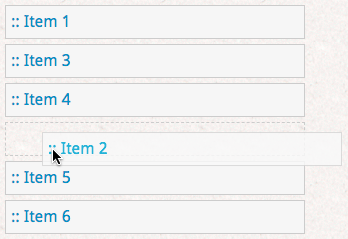
Some applications, such as todo lists, need to maintain a user-defined order of items. The challenge is that the order is arbitrary and can change when the user rearranges items:
This article investigates the best way to model the situation in SQL. We’ll examine several ways to do it, and will assess three properties for each:
The most natural first attempt is to add an auto-incrementing integer column to track each item’s position:
create table todos (
  task text,
  pos serial, -- <== add this

  unique (pos)
);
Populating the list is easy:
insert into todos (task)
    values ('experiment with sql'),
           ('write article'),
           ('relax'),
           ('repeat');

select * from todos order by pos asc;
/*
┌─────────────────────┬─────┐
│        task         │ pos │
├─────────────────────┼─────┤
│ experiment with sql │   1 │
│ write article       │   2 │
│ relax               │   3 │
│ repeat              │   4 │
└─────────────────────┴─────┘
*/
What’s more difficult is inserting items within the list, or reordering existing items. Suppose we want to insert a new “edit article” task between items 2 and 3. This requires shifting items 3 and greater one position ahead, and inserting the item at position 3. But even the first step runs into problems:
-- shift items 3 and greater one position ahead

update todos set pos = pos+1 where pos >= 3;
/*
ERROR:  23505: duplicate key value violates unique constraint "todos_pos_key"
DETAIL:  Key (pos)=(4) already exists.
*/
The uniqueness constraint makes the update sensitive to when each table row gets processed. In our case it attempted to move item 3 to position 4 without first moving 4 to 5.
We can enable more flexible behavior by deferring the uniqueness constraint inside a transaction.
create table todos (
  task text,
  pos serial,

  unique (pos)
    deferrable initially deferred
    -- ^^^ add this
);

-- now we can shift the list and insert an item
begin;

update todos set pos = pos+1 where pos >= 3;

insert into todos (pos, task) values
  (3, 'edit article');

-- don't forget to increment the sequence
select nextval('todos_pos_seq');

commit;
How does this technique stack up?
Rather than using sequential integers, what about leaving space in between them? Just like skipping line numbers in the BASIC programming language, we can skip position values in the table leave room between them. Something like:
create sequence todos_gapped_seq
  increment by 65536;

-- the todos table is declared same as before
To insert an item between two others, simply use the position that is the average of the surrounding items. However with our choice of 2^16 blanks between each item, we can support no more than sixteen consecutive insertions between the first and next item. After reaching this limit we would have revert to the previous approach of shifting items forward.
How does this compare with the sequential integer approach?
What if we store the position of each row using float or
numeric values rather than int or
bigint? This would allow squeezing new elements between
others, rather than shifting items forward to make room. Here’s the
idea:
create sequence todos_seq;

create table todos (
  task text,
  pos float not null
    default nextval('todos_seq'),

  unique (pos)
);

insert into todos (task)
    values ('experiment with sql'),
           ('write article'),
           ('relax'),
           ('repeat');
Now inserting an item between rows 2 and 3 is easy:
insert into todos (pos, task) values
  ((2.0+3)/2, 'edit article');
It seems like a perfect solution! However floating point numbers have limited precision. For example, if we repeatedly insert between 1000 and 1001, cutting by halves each time, then by the 38th iteration it will truncate to exactly 1000:
┌────┬──────────────────┐
│ i  │       val        │
├────┼──────────────────┤
│ 25 │  1000.0000000298 │
│ 26 │  1000.0000000149 │
│ 27 │ 1000.00000000745 │
│ 28 │ 1000.00000000373 │
│ 29 │ 1000.00000000186 │
│ 30 │ 1000.00000000093 │
│ 31 │ 1000.00000000047 │
│ 32 │ 1000.00000000023 │
│ 33 │ 1000.00000000012 │
│ 34 │ 1000.00000000006 │
│ 35 │ 1000.00000000003 │
│ 36 │ 1000.00000000001 │
│ 37 │ 1000.00000000001 │
│ 38 │             1000 │
│ 39 │             1000 │
│ 40 │             1000 │
└────┴──────────────────┘OK, so the float type eventually runs out of precision –
what about using the numeric (aka decimal)
type in SQL? It has a variable size that grows as needed to store
precise numbers. How big does it get? Let’s ask the database:
select
  (1 / power(2, i))::numeric as val,
  pg_column_size(1 / power(2, i)::numeric) as sz
from generate_series(1, 21) as i;

/*
┌─────────────────────────┬────┐
│           val           │ sz │
├─────────────────────────┼────┤
│                     0.5 │  8 │
│                    0.25 │  8 │
│                   0.125 │  8 │
│                  0.0625 │  8 │
│                 0.03125 │ 10 │
│                0.015625 │ 10 │
│               0.0078125 │ 10 │
│              0.00390625 │ 10 │
│             0.001953125 │ 12 │
│            0.0009765625 │ 12 │
│           0.00048828125 │ 12 │
│          0.000244140625 │ 12 │
│         0.0001220703125 │ 14 │
│        0.00006103515625 │ 12 │
│       0.000030517578125 │ 12 │
│      0.0000152587890625 │ 12 │
│     0.00000762939453125 │ 14 │
│    0.000003814697265625 │ 14 │
│   0.0000019073486328125 │ 14 │
│  0.00000095367431640625 │ 14 │
│ 0.000000476837158203125 │ 16 │
└─────────────────────────┴────┘
*/
It reaches 12 bytes pretty quickly, when in fact cutting between 0
and 1 like this is the best case. As the integer part grows,
numeric requires even more bytes. But, aside from disk
usage, this is the best approach so far.
numeric
type to exceed 128 bits if there aren’t many list rearrangements, and
most operations on the column will be indexed comparisons, not
arithmetic.numeric values may
continue consuming more space as the list keeps being rearranged, but
for all practical purposes you can rearrange the list forever.float.Both the float and numeric types ultimately
ran into limitations because of how we picked midpoints using averages.
Those midpoints quickly consumed precision. The float
couldn’t handle it at all, and the numeric got bloated.
However there’s a mathematical trick we can use to get the robustness of
a numeric type with the size of a float.
In the course of working on this article, I created a new base type
for PostgreSQL called rational. It’s available as a
database extension here. It performs
exact fractional arithmetic and I designed it to always use exactly 64
bits per fraction, which is the same size as PostgreSQL’s
float type. (I took inspiration from the
postgres
wiki.)
Fractions are much more interesting than they’re presented in school. Non-negative fractions actually form a binary tree, with every fraction (in lowest terms) appearing at a unique node.
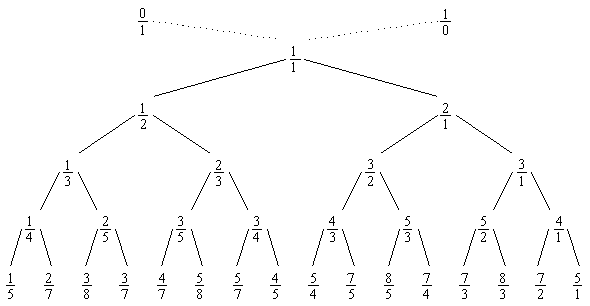
This “Stern-Brocot tree” is named after its independent discoverers from the 1860s: a mathematician and a clockmaker. If you want to learn more of the theory, check out this youtube video.
The tree helps us like this: if you want to find a fraction within certain bounds (a < x < b), then traverse the Stern-Brocot tree – constructing it as you go – in a binary search. As soon as you hit a node within bounds, stop. That may sound difficult, but pg_rational has the logic built-in.
-- the "rational" type comes from an extension
-- https://github.com/begriffs/pg_rational

create extension pg_rational;

create sequence todos_seq as integer;

create table todos (
  task text,
  pos rational not null
    default nextval('todos_seq')::integer,

  unique (pos)
);

insert into todos (task)
    values ('experiment with sql'),
           ('write article'),
           ('relax'),
           ('repeat');

select * from todos order by pos asc;
/*
┌─────────────────────┬─────┐
│        task         │ pos │
├─────────────────────┼─────┤
│ experiment with sql │ 1/1 │
│ write article       │ 2/1 │
│ relax               │ 3/1 │
│ repeat              │ 4/1 │
└─────────────────────┴─────┘
*/
That was as easy as using a float or integer! Inserting
a new value is easy too:
insert into todos (pos, task) values
  (rational_intermediate(2,3), 'edit article');

select * from todos order by pos asc;
/*
┌─────────────────────┬─────┐
│        task         │ pos │
├─────────────────────┼─────┤
│ experiment with sql │ 1/1 │
│ write article       │ 2/1 │
│ edit article        │ 5/2 │
│ relax               │ 3/1 │
│ repeat              │ 4/1 │
└─────────────────────┴─────┘
*/
The terms of these fractions are expressed in lowest terms and grow slowly at each insertion. For instance you can see from the tree diagram earlier that inserting between 1 and 0 toward 0 generates 1/2, 1/3, 1/4 … which can go a very long time because numerators and denominators in pg_rational each get 32 bits of storage.
A number of observant readers including Michael Wolfe, David Marcin and “arnioxux” on Hacker News, pointed out that there are paths through the Stern-Brocot tree where the fraction terms rapidly increase. For instance continually reversing directions and walking down the middle of the tree (L, R, L, R, L…) increases the denominators in a Fibonacci sequence: 1/1, 1/2, 2/3, 3/5, 5/8, 8/13 etc. The 46th Fibonacci number – 1,836,311,903 – is the largest that can fit in a signed 32-bit integer.
So although finding midpoints with this method still usually beats taking averages, it’s not a silver bullet for any pattern of insertions. It works especially well for repeated inserts in one direction, and worse for a sort of weaving insert around new elements. The pathological pattern does not feel like a common thing for a user to do (since simply swapping the positions of two items can happen by swapping their numbers, not inserting new numbers). Nonetheless I should investigate adding a function in pg_rational to re-normalize a list into simpler fractions.
This final approach for storing list order is to do calculations with
the rational type, but store the result as a float.
Rationals in the library can convert back and forth:
-- convert float to rational
select 0.263157894737::float::rational;
-- => 5/19

-- convert rational to float
select '-1/2'::rational::float;
-- => -0.5
So we can define the todos table as in the float
method:
create sequence todos_seq;

create table todos (
  task text,
  pos float not null
    default nextval('todos_seq'),

  unique (pos)
);

insert into todos (task)
    values ('experiment with sql'),
           ('write article'),
           ('relax'),
           ('repeat');
But now insert using rational numbers, which will get coerced to
float when saving into the column.
insert into todos (pos, task) values
  (rational_intermediate(2,3), 'edit article');

select * from todos order by pos asc;
/*
┌─────────────────────┬─────┐
│        task         │ pos │
├─────────────────────┼─────┤
│ experiment with sql │   1 │
│ write article       │   2 │
│ edit article        │ 2.5 │
│ relax               │   3 │
│ repeat              │   4 │
└─────────────────────┴─────┘
*/
Floats created by rational_intermediate don’t seem to
run up against precision problems like those generated by taking
averages. For example taking repeated intermediates from zero going
toward one makes this pattern:
select
    (i, i+1)::ratt::rational  AS fract,
    i::float / (i + 1)::float AS float
 from generate_series(1, 15)  AS i;
/*
┌───────┬───────────────────┐
│ fract │       float        │
├───────┼───────────────────┤
│ 1/2   │               0.5 │
│ 2/3   │ 0.666666666666667 │
│ 3/4   │              0.75 │
│ 4/5   │               0.8 │
│ 5/6   │ 0.833333333333333 │
│ 6/7   │ 0.857142857142857 │
│ 7/8   │             0.875 │
│ 8/9   │ 0.888888888888889 │
│ 9/10  │               0.9 │
│ 10/11 │ 0.909090909090909 │
│ 11/12 │ 0.916666666666667 │
│ 12/13 │ 0.923076923076923 │
│ 13/14 │ 0.928571428571429 │
│ 14/15 │ 0.933333333333333 │
│ 15/16 │            0.9375 │
└───────┴───────────────────┘
*/
Floats can handle this sequence for a very long time.
-- how long until floats cannot distinguish successive fractions?
select min(i)
  from generate_series(1, 100000000) as i
 where (i::float/(i+1.0)) = ((i::float+1.0)/(i+2.0));

-- => 94911150
Other fractions may pose more difficulties for the float
representation, but from my limited experiments it looks like this way
of choosing midpoints works a lot better than taking averages.
Ultimately this approach has its pros and cons compared with just using pg_rational. The space on disk is the same. The speed of comparing floats is faster than comparing fractions (a single CPU instruction vs an extra cross-multiplication of integer terms). But finding intermediates requires first turning floats to fractions using an iterative algorithm. This is adds overhead compared to simply storing the fractions.
Based on the arguments above, I’d recommend using true fractions with pg_rational.
Here are a few extra notes to help you get the most out of the extension.
Insert the first item as 1/1 rather than
0/1. The algorithm for finding intermediate values can
never get below zero, so starting at one will allow you to insert future
items before the first item. You could even add a constraint to the
position column enforcing that all values are strictly greater than
zero.
Add a btree index to the position column. The rational type supports an index. You’ll get an index automatically simply by adding a uniqueness constraint to the column.
Here’s the easiest way to insert a new item immediately after a given one, cutting earlier than any existing subsequent items:
-- add item immediately after item 2
INSERT INTO todos (pos, task)
SELECT rational_intermediate(2, min(pos)), 'edit article'
  FROM todos
 WHERE pos > 2;
This works even if the item is the very biggest one, since
rational_intermediate treats NULL in the second argument as
infinity.
Inserting an item immediately before another uses
similar logic except with max.
You probably don’t even want to use a sequence to keep track of the largest item inserted. You can insert at the end of the list by doing this:
INSERT INTO todos (pos, task)
SELECT rational_intermediate (max(pos), NULL), 'last one'
  FROM todos;
This would work even on an empty table. I used a sequence earlier just to cut down on the code for inserting a batch of items.
To relabel the positions and hide the fractional numbering:
select row_number() over () as pos,
       task
  from todos
 order by pos asc;
Although sending this to a client application would prevent the client from knowing the true positions in order to ask the database to rearrange them, so the relabeling should probably happen at display time.
Written by Joe "begriffs" Nelson